We count the symbols.You price the bid.
Request access now. Confirmation is immediate. An invite follows when a seat opens.
Why Estym8 exists
How Estym8 works
Upload the plan set
A bid folder or one drawing PDF.Estym8 sorts the files and counts the symbols on the drawings that qualify.One drawing usually takes 15 minutes to 2 hours, and you can leave.We email you when the count is ready, and we send you a text alert if you opt in.Review the count
Counts, notes printed on the sheets, conflicts, and draft RFIs show up on the project.A rough pass tells you whether the job is worth a full takeoff, without uploading the set again.Price the bid
Open the workbook and the marks on the drawings.See where each count came from.Confirm or edit a line.Unit costs for the bid come from RSMeans.Estee can explain a count.You decide what goes in the bid.Keep the same counts
The report and the submittal package use this takeoff.A rough pass can become the full takeoff without starting over.
Sample
This is a sample row, not a live job. Each project shows where it stands and what you do next.
Reads legends · counts drawn symbols · checks printed schedules
Westside medical office — bid package
Electrical · commercial TI
Open the estimate, check the counts, and see which sheet each count came from.
Inside the app
The project list, a job, the estimate, and Estee.
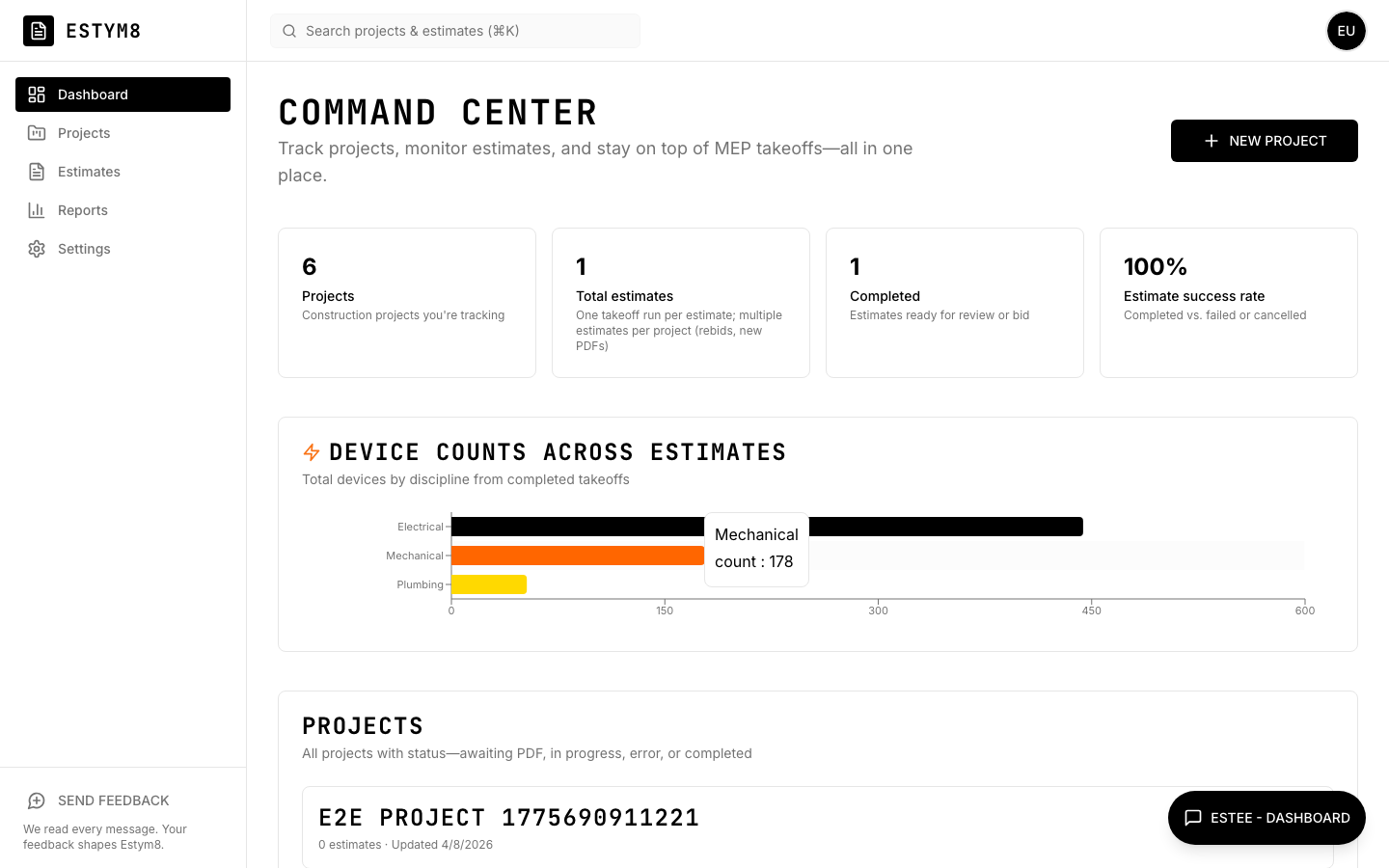
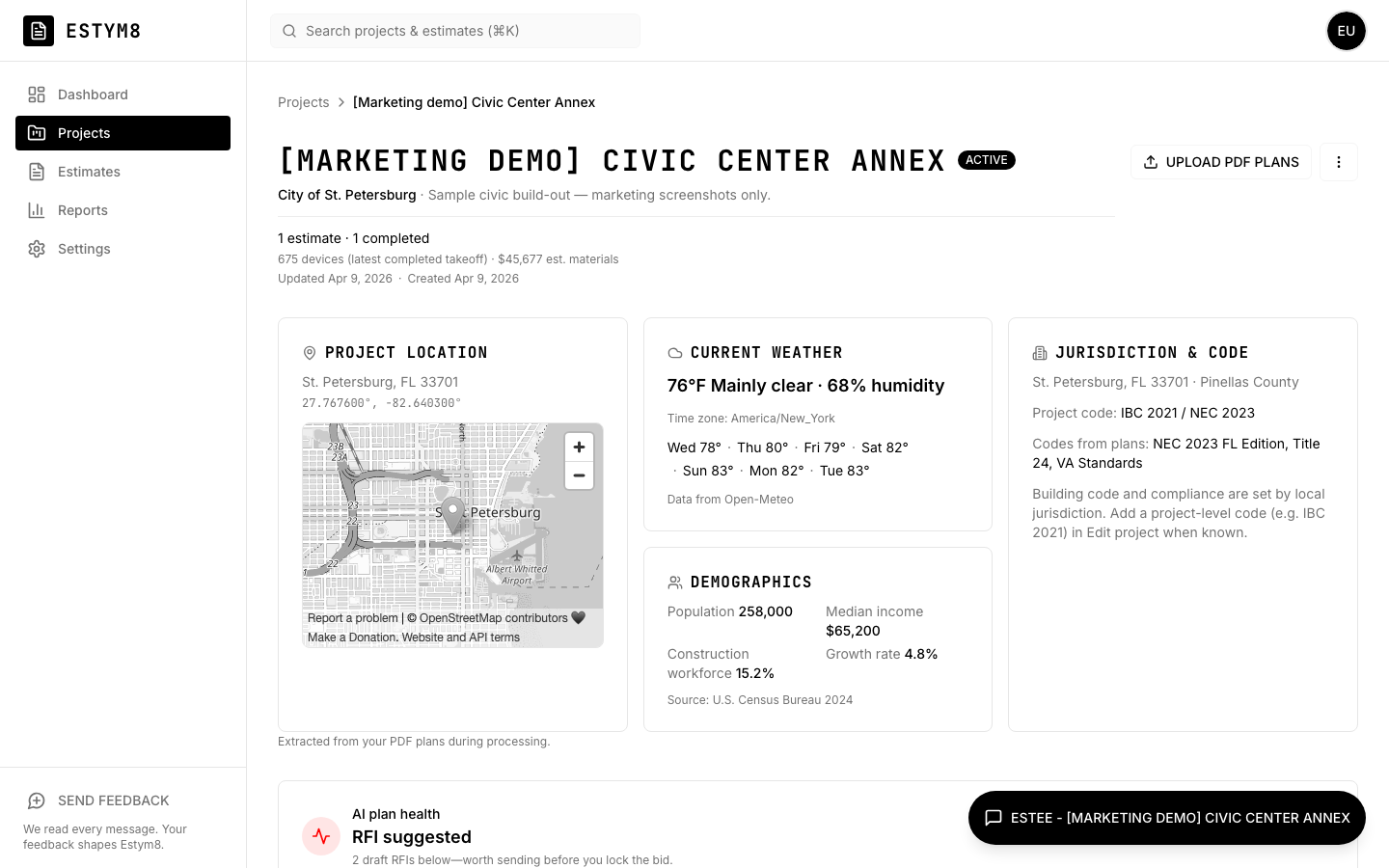
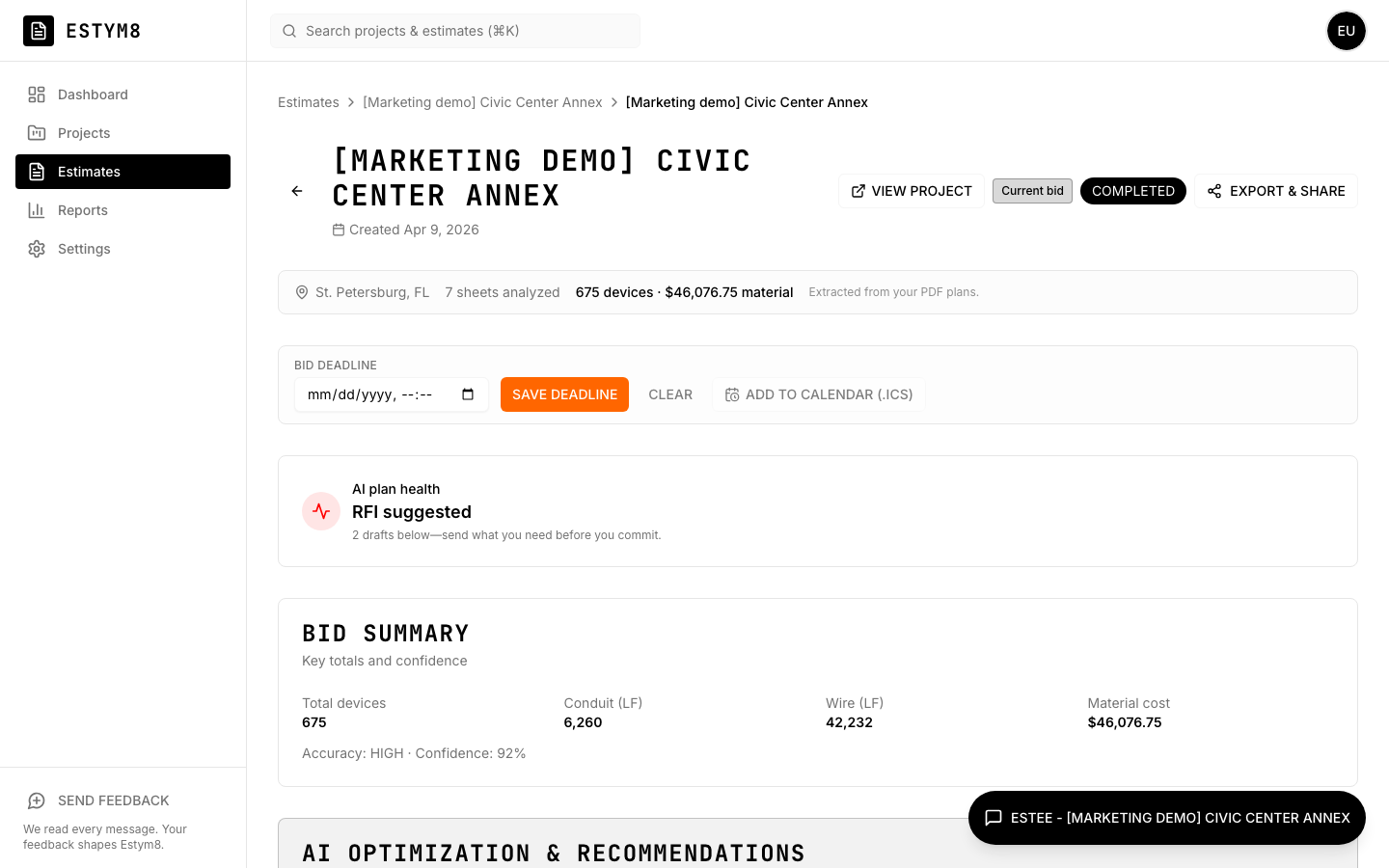
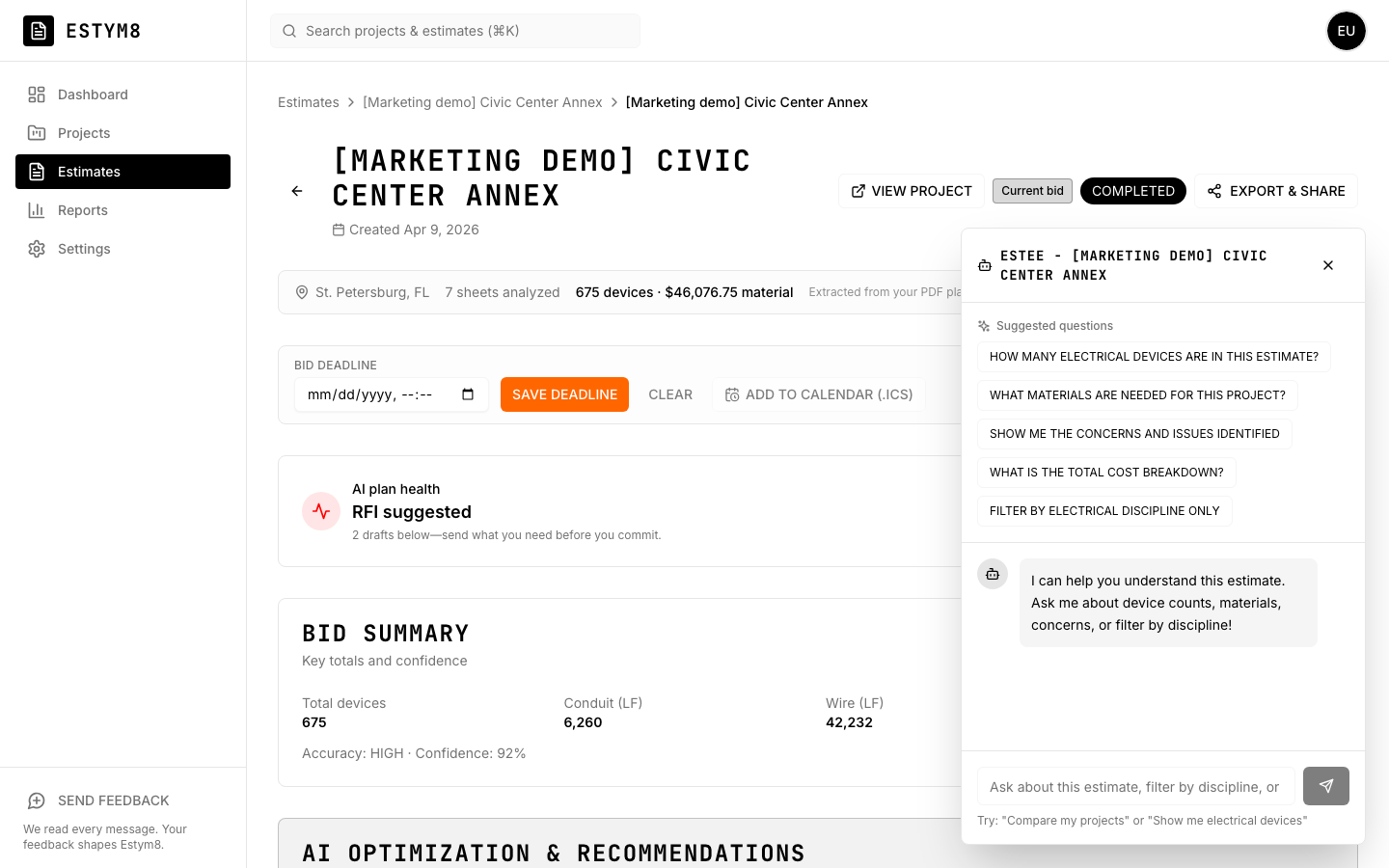
What Estym8 does
- Upload a bid folder or one drawing PDF. Estym8 sorts every file.
- Takeoffs run for the trades on the drawings: electrical, mechanical, plumbing, civil, architectural, and structural.
- Screen a job with a rough order of magnitude (ROM) or a wild-ass guess (WAG). Estym8 counts the symbols.
- Read what is printed on the sheets and count from it.
- Open the takeoff workbook and hover a quantity to see which sheet it came from.
- Download a narrative report and, after the bid, submittal packages tied to the same lines.
- You review the counts and price the bid.
What Estym8 does not do
- You stay the estimator.
- You price the bid, and you send it.
- Estee answers questions about the job. Estym8 is the takeoff, not a chatbot.
How to get access
Request access
Use your work email.Get confirmation
It arrives as soon as you submit.Wait for an invite
An invite follows when a seat opens.
Once you are in, ask Estee to explain a count. You price the bid.
How Estym8 compares
Most takeoff tools count, mark up, or price. Estym8 counts the symbols from one upload and shows you the sheet each count came from. You price the bid.
Compare: pick a product you already know.
| Capability | Estym8 | Trimble (Accubid / LiveCount) |
|---|---|---|
| How it fits your process | One upload: a bid folder or one drawing PDF. Estym8 sorts the files and counts the symbols. You see which sheet each count came from. You price the bid. | Drawing-centric estimating: assemblies, libraries, takeoffs. AI helps spot symbols; you still build and check the bid in the Trimble workflow. |
| Whole bid folder | Drop the bid folder. Estym8 sorts every file and counts the drawings that qualify. | Drawing-first. The rest of the package is mostly handled outside the core workflow. |
| AI at the core | Estym8 reads the legend and counts the symbols that are drawn. You price the bid. | Traditional workflow first; AI assists pieces (for example takeoff hints). |
| Quantities by trade | Yes. Electrical, mechanical, plumbing, civil, architectural, and structural can run from one folder. Coverage depends on the sheets. | Yes (quality varies). |
| Conflicts and draft RFIs | Conflicts and draft RFIs show up with the count. Each one points back to a file or a line printed on a sheet. You decide what goes in the bid. | — |
| Time for the count | One drawing usually takes 15 minutes to 2 hours, and you can leave. A folder runs more than one takeoff. You price the bid when the count is ready. | Manual / semi-automated. |
| Chat with your plans | Estee answers questions about a count. She can propose a change on an estimate. Nothing is saved until you confirm. | — |
| Change orders & GC handoff | Change orders on the estimate, a report you can download as Word or PDF, and a read-only link for the GC. That link does not need an Estym8 login. | Enterprise workflows. |
Each column uses that product's public description from 2024–2026. We also track Togal.AI (opens in a new tab), Forma Takeoff (Autodesk) (opens in a new tab), and Gordian Flash AI Estimating (RSMeans) (opens in a new tab). Ask us if you want the written comparison.
What's on the horizon
The list below is later work. Symbol counts, conflict flags, and a report you can check are already in the product.
- More accurate square footage and lineal footage from the drawings, including alignment to CAD
- Line-by-line unit costs from RSMeans
- Stronger checks across the documents in the folder, on top of today’s conflicts and quantity checks
- Spreadsheet and photo checklists, beyond sorting the files in the folder
- Sheet alignment in CAD and punch-list closeout, beyond the marks on the drawing
- A way to edit the run plan. Today Estym8 builds that plan from the files you upload
- Takeoff math that applies local code amendments, beyond the code citations we already flag
One suite.Multiple products.
- We count the symbols.You price the bid.
- We tie each claim to its source.You decide.
- We draft the findings.Staff keep the stamp.
- We check the drawing set.You issue.
- We read the parcel documents.You decide.
Frequently asked questions
- Is Estym8 available to everyone?
- During testing, access is by approval.Request access with your work email.Confirmation is immediate.An invite follows when a seat opens.
- What does Estym8 do?
- Estym8 reads a plan set or a bid folder.It sorts the files, counts the symbols on the drawings that qualify, and shows you the sheet each count came from.You can run a rough pass first, or a full takeoff, from the same upload.Electrical, mechanical, plumbing, civil, architectural, and structural can run from that folder.Coverage depends on the sheets.You also get conflicts, draft RFIs, and the notes printed on the sheets.One drawing usually takes 15 minutes to 2 hours.A full folder takes longer because it runs more than one takeoff.
- What is ROM / WAG screening?
- A rough order of magnitude (ROM) or a wild-ass guess (WAG) is a fast read on whether to chase the job.It uses the same upload as a full takeoff.The result is labeled as a screening pass, not the bid.You can turn a promising job into the full takeoff without starting over.
- What is the "As Printed on the Sheets" view?
- On the project, As Printed on the Sheets copies the title block, the notes, the exceptions, and the allowances straight from each PDF.Every line points back to a sheet.You review what the set says.
- What other products are in the suite?
- Estym8 counts the symbols.You price the bid.ColdEyes drafts the findings.Staff keep the stamp.PlanM8 checks the drawing set.You issue.Bodi ties each claim to its source.You decide.SiteM8 reads the parcel documents.You decide.
- Who checks the code and the jurisdiction?
- PlanM8 checks the drawing set before it is issued.ColdEyes drafts the findings.Staff keep the stamp.Estym8 counts the symbols.You price the bid.
- Can I download a single hand-off document for a project?
- Yes.Download one report as Markdown, Word, or PDF.It includes the notes from the sheets, the takeoffs, the conflict log, and the draft RFIs.
- Does Estym8 support submittal registers and merged PDFs after the bid?
- Yes.After the bid, build a submittal package from the same estimate: a register, a compliance matrix, and one merged PDF with the cut sheets you attach.
- Can I see where a count or a dollar amount came from?
- Yes.On the workbook, hover a quantity to see which sheet it came from.Hover a dollar amount to see which materials, labor, or field line rolled into it.You price those lines.
- Who is Estym8 for?
- Commercial, institutional, and larger multi-family teams: electrical and MEP subcontractors, and GC precon.Smaller residential-only remodels are a weaker fit today.You want a count you can check before you price the bid.
- How long does a takeoff take?
- One drawing, or one trade in the set, usually takes 15 minutes to 2 hours.Page count and how dense the symbols are change that.A full bid folder runs several takeoffs, so it takes longer.You can leave.We email you when each one finishes, and we send you a text alert if you opt in.
- Does a folder upload count as one takeoff?
- No.A folder is one upload, and it can run more than one takeoff.You are not charged per takeoff.Each plan includes a monthly processing allowance.The takeoff stops when that allowance is used.Additional processing is $3 for each $1 of processing past the allowance.The pricing page shows the allowance on each plan.
- What do Solo, Studio, and Firm include?
- Solo, Studio, and Firm include the same takeoff: one drawing or a bid folder, file sorting, conflicts, draft RFIs, Estee, and exports.Solo includes $36 of processing each month.Studio includes $60.Firm includes $156 of processing each month, and Firm starts at 6 seats.Past the allowance, processing is $3 for each $1 of processing.Contact us to add processing, or to set up Firm.
- Does Estym8 replace an estimator?
- No.You review the counts, add what the drawings do not show, and price the bid.Unit costs for that bid come from RSMeans.The number you send is yours.
- Where can I see pricing?
- Use the Pricing page. Solo starts at $179/mo for one seat. Annual billing saves 15% versus twelve months at the monthly price.
- What can Estee do?
- Estee is the assistant inside Estym8.On this site she answers questions about the product.After you sign in, she answers from your projects: counts, materials, conflicts, draft RFIs, and what is printed on the sheets.She can propose a change on an estimate.Nothing is saved until you confirm.
Count the next plan set
No payment until you choose a plan. You can review pricing anytime.